Accessing the App
Last updated: February 26, 2026
How can I download the Tigerhall mobile app on my iOS device?
Follow the steps below to download the app on your iOS device:
Go to the App Store
Search for Tigerhall
Download the app
How can I download the Tigerhall mobile app on my Android device?
Follow the steps below to download the app on your Android device:
Go to the Play Store
Search for Tigerhall
Download the app
How can I access the Tigerhall web app?
To access the web app, go to https://app.tigerhall.com/login
I am struggling to access the web app or am unable to open it. What do I do?
Please try clearing any stored data and cache on Tigerhall in the browser that you use. If you are still unable to access the app, kindly log a ticket in the support portal or write to us at support@tigerhall.com.
I am facing difficulty accessing content in the mobile app, what do I do? How do I clear cache in the Tigerhall mobile app?
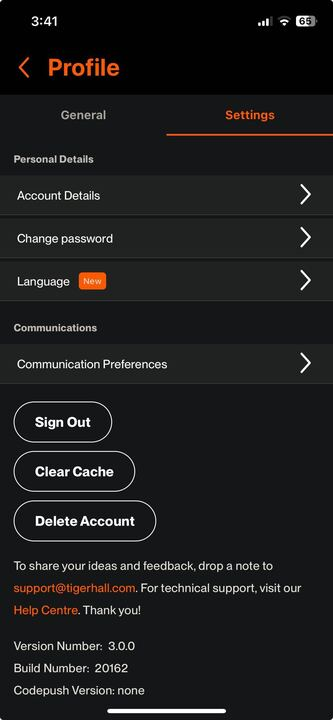
If you are facing issues with the mobile app, please check whether you are on the latest version by checking the App Store or Play Store. If the issue persists, try clearing your cache to see if the issue is resolved. Here the steps to clear cache in the mobile app:
Go to Profile
Click on the Settings icon
Go to the Settings tab
Click on the “Clear Cache” button
If none of the above work, kindly log a ticket in the support portal or write to us at support@tigerhall.com.